Macrium vs Acronis: what's the best solution for your environment?
Why Macrium and Acronis Are Often Compared
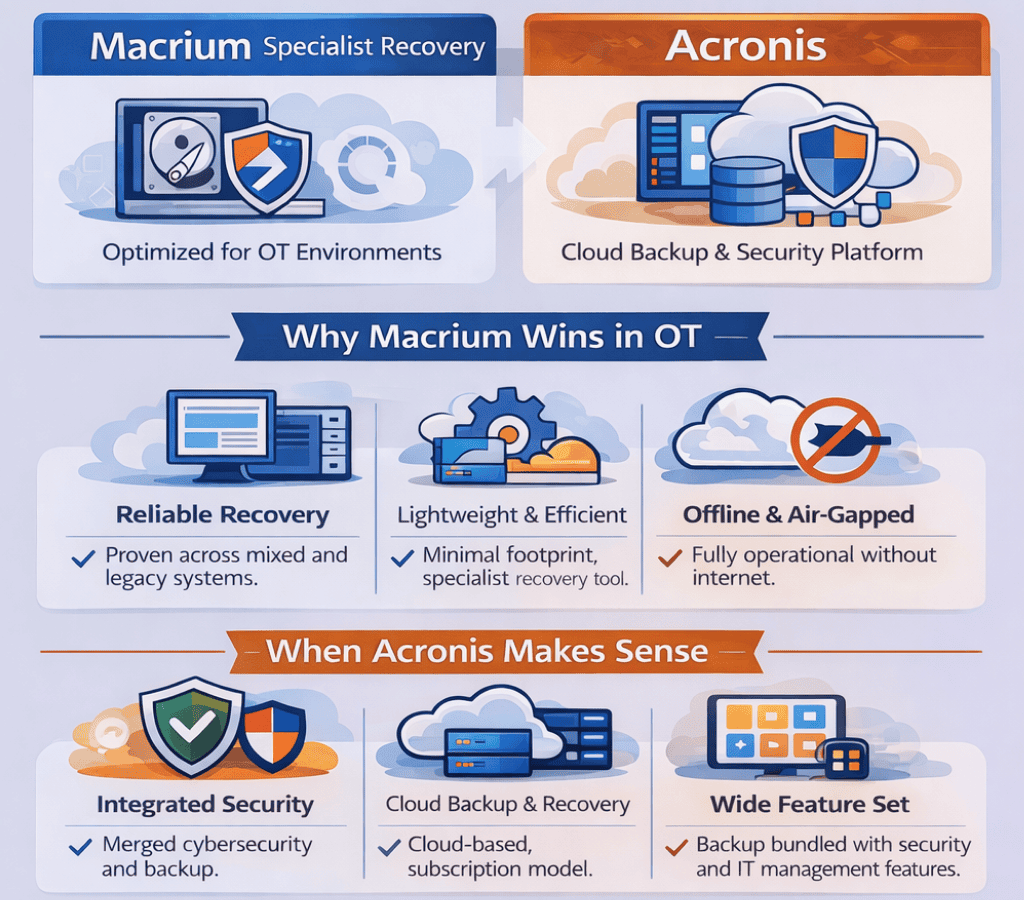
Macrium and Acronis get shortlisted together all the time. They probably shouldn’t be - not because one is bad, but because in reality, they are built for solving different problems and environments.
Acronis is a cyber-protection platform. It combines backup with security tooling, centralised management, and cloud-first workflows. For IT teams running connected, centrally-managed estates, that consolidation can be genuinely useful.
Macrium, however, is a specialist imaging and recovery tool. It’s built around one question: when something fails, can you quickly and reliably restore a machine to a known-good state, without drama? That’s it. That’s the brief.
Most comparison articles treat this as a feature contest. It isn’t. The right question is which tool is built for the constraints your environment operates under. For OT operators, critical infrastructure teams, and anyone running long-lifecycle systems on isolated networks, those assumptions matter more than any feature grid.
The Real Difference Between Macrium and Acronis
Acronis optimises for consolidation. Macrium optimises for deterministic recovery.
That sounds abstract, so here’s what it means in practice. Acronis aims to be the single platform that handles backup, recovery, endpoint security, and management policy - ideally across a connected estate, through a cloud-managed console. Macrium aims to be the reliable tool you reach for during an incident - trusted to rebuild a critical machine to a known-good state, even in complex environments with legacy systems, mixed hardware, or restricted connectivity - without improvisation.
System imaging, to be clear, means capturing a complete, restorable copy of a machine’s disk - operating system, applications, configuration, data, all of it - so you can rebuild the entire system to a known-good state after a failure. It’s not file backup. It’s machine restoration.
For teams where recovery is a high-stakes operational event rather than an IT ticket, that distinction shapes everything.
How does Acronis Compare to Macrium?
Architecture shows up quickly once a tool is deployed. It affects how it behaves during change, how it is managed, and how recovery unfolds under pressure.
Macrium: Specialist Imaging and Recovery
Macrium does fewer things, more predictably. Its scope is system imaging, and deterministic recovery. That focus isn’t a limitation - it’s a deliberate design choice that pays dividends in constrained OT and critical infrastructure environments.
In practice, Macrium prioritises:
- ▪️Predictable restore workflows that can be documented, rehearsed, and handed to a operator without improvisation
- ▪️A lightweight footprint - minimal background services, fewer platform dependencies, less change on the production system
- ▪️Offline-capable operation, including activation paths that don’t assume internet access
- ▪️Flexible licensing options, including subscription and perpetual models, aligned to long-lived operational assets and varied procurement models.
Acronis: Broad Cyber-Protection Suite
Acronis is built as a multi-function platform. Backup, recovery, security, and management capabilities are integrated under a unified framework. This architecture prioritises consolidation and central oversight across connected environments.
Why Reliable Backups Enable Reliable Recovery
Here’s something that gets missed in most backup evaluations: recovery reliability is only visible at restore time. Not backup time. Restore time.
Many recovery failures aren’t caused by missing backups. They’re caused by restores that are slow, inconsistent, incomplete, or operationally complicated in ways that weren’t discovered until an actual failure.
What “Deterministic Recovery” Actually Means
Deterministic recovery means the restore process is repeatable and predictable. Not “probably fine.” Predictable.
Operators in high-stakes environments need to know, with confidence:
- ▪️The recovery media works on the hardware they actually have, not the hardware they used to have (even if this is dissimilar hardware)
- ▪️The steps are stable enough to document into a runbook and train operators against.
- ▪️The restore doesn’t depend on last-minute connectivity, a cloud portal, or a platform service being available
Macrium’s specialist focus maps directly to that requirement. Acronis can absolutely perform recovery - but recovery is one capability inside a broader platform, not its centre of gravity.
Reliable Backup Is the First Step in Deterministic Recovery
A restore can only be predictable if the backup behind it is predictable.
In operational environments, backups rarely run in ideal conditions. Production systems often cannot be taken offline. Backups run with lower priority than live workloads. Network bandwidth is constrained. CPU cycles are precious. In that context, reliability means more than “the job completed.”
It means:
- ▪️CPU and I/O priority can be controlled so production workloads win
- ▪️Network bandwidth can be throttled to avoid saturating control networks
- ▪️Multiple backups across distributed systems can run without overwhelming shared infrastructure
- ▪️Interrupted backups can resume without restarting from scratch
- ▪️Mixed hardware and mixed Windows versions add another layer of complexity. The backup engine must behave consistently across ageing systems, custom builds, and constrained environments.
Macrium’s design acknowledges these realities. Backup impact can be controlled, and recovery workflows remain consistent across mixed estates. That combination is what makes deterministic restore possible in practice, not just in theory.
How Macrium Achieves Fast Restore Times
Fast recovery is often critical in operational and embedded environments where downtime has immediate impact.
Macrium includes Rapid Delta Restore, which restores only the blocks that have changed between an image and the destination filesystem. By avoiding a full disk rewrite, restores can complete much faster in many scenarios.
However, restore performance still depends on factors such as storage performance, image frequency, data change rates, and whether recovery procedures have been validated through realistic restore drills. In OT and embedded environments, regular testing is essential to ensure reliable recovery.
How to Evaluate Backup and Recovery Tools Properly
Feature grids are almost useless for this decision. The test that matters is: can this tool restore a machine to a known-good state, under realistic constraints, in an acceptable time, without requiring heroics?
A disciplined evaluation plan typically includes:
- ▪️Bare-metal restore testing - restore to an empty disk using recovery media, from scratch
- ▪️Dissimilar hardware testing - restore to a replacement machine that isn’t identical, because during a real failure, it often won’t be
- ▪️Timed restore drills against a defined RTO (Recovery Time Objective - the maximum acceptable downtime before service must be restored)
- ▪️Runbook validation - a competent operator who didn’t write the runbook follows it successfully, without help
Macrium’s appeal in operational environments is that running recovery as a controlled, repeatable engineering discipline is straightforward. Not aspirational - straightforward.
Backup and Recovery in Offline and Air-Gapped Environments
Offline capability isn’t a checkbox. It’s a lifecycle property. It covers deployment, activation, routine operation, and incident response — and all of those need to work without external dependencies.
For clarity on terminology:
- ▪️Offline means the tool can be installed and used without internet connectivity for core backup and recovery functions
- ▪️Air-gapped means systems are deliberately isolated from networks — physically or logically — to reduce attack surface
Consider a water treatment facility running Windows-based SCADA systems on an isolated control network. Recovery tooling for that environment can’t assume a cloud portal is reachable. It can’t assume the activation server is accessible. It can’t require an update before it functions. The restore path has to work from local media, with no external dependencies, on hardware that may not have been touched in three years.
Can Macrium Work in Air-Gapped Environments?
Yes.
Macrium is built to run fully on-premises and supports offline activation. That matters in isolated environments because the entire recovery path, from media creation through to restore, remains viable when connectivity is unavailable or prohibited.
Can Acronis Work in Air-Gapped Environments?
Acronis supports offline deployments, but air-gapped operation is not the primary focus of the platform. Macrium is designed specifically for environments where systems remain isolated and recovery must work entirely without external dependencies.
What to Actually Assess Beyond “It Can Run Offline”
Operational teams evaluating offline capability typically look at:
- ▪️How recovery media is created, secured, and periodically refreshed
- ▪️How backup images are transferred between network zones, including removable media handling and chain of custody
- ▪️How integrity is verified without external dependencies
- ▪️How licensing and activation behave during prolonged disconnection - weeks or months, not just hours
Licensing and Lifecycle Alignment
Licensing is often treated as a commercial topic. In OT and critical infrastructure environments, it’s also an engineering decision.
Operational systems can remain in service for a decade or longer. Some run on stable but ageing operating systems. Change is tightly controlled. Updates require planning windows. Network access may be restricted. In that context, backup and recovery tooling needs to remain usable and supportable through the asset lifecycle. Licensing models need to align with how those environments operate — whether that means long-term stability, structured renewal cycles, or centrally managed subscription agreements.
Macrium’s Licensing Approach
Macrium supports both subscription and long-term licensing options, allowing organisations to choose the model that best fits their operational and procurement realities.
If stability is key then with a perpetual licensing option, licences don’t unexpectedly expire in the field. For environments where renewing or upgrading tooling requires a validation cycle, a change control board, and a maintenance window, that predictability is operationally significant.
If stability is key then with a perpetual licensing option, licences don’t unexpectedly expire in the field. For environments where renewing or upgrading tooling requires a validation cycle, a change control board, and a maintenance window, that predictability is operationally significant.
Acronis’s Licensing Approach
Acronis is primarily subscription-led and evolves as a platform over time. That’s well-suited to environments where ongoing renewals are normal operations and regular updates are welcome. For long-lived operational estates where the goal is stability over time, the trade-off is worth examining explicitly.
When Macrium or Acronis Is the Right Choice
These aren’t absolute rules. The right choice depends on how your environment is designed and operated — and should always be validated through real restore testing.
Acronis May Be the Better Fit When
- ▪️Vendor consolidation across backup and security is a priority
- ▪️Integrated security within the backup platform is required
- ▪️The organisation standardises on cloud-managed tooling
- ▪️An MSP-led or multi-tenant operating model that drives central oversight
Macrium Is Often the Better Fit When
- ▪️Deterministic system imaging and fast, reliable restore is the primary requirement, and the environment includes mixed or legacy systems where predictability matters more than feature breadth
- ▪️Offline and air-gapped operation is required
- ▪️Operational impact and platform footprint must be minimised
- ▪️Licensing must align with long-lived operational assets, including perpetual and LTSC-style options
- ▪️In OT and critical infrastructure environments, these constraints are common. When recovery is treated as a high-stakes engineering discipline rather than an IT platform feature, a specialist imaging tool often proves the more natural fit.
Macrium vs Acronis FAQ
Is Macrium better than Acronis?
Macrium is typically the stronger choice where the priority is deterministic system imaging and predictable on-prem recovery - particularly in offline, air-gapped, or long lifecycle environments. Acronis is typically the stronger choice where consolidated cyber-protection, integrated security tooling, and centralised management are the primary requirements.
Is Macrium a credible Acronis alternative for critical systems?
Yes - and it’s frequently evaluated specifically because it offers a specialist recovery tool with a smaller footprint and more predictable restore behaviour on Windows operating systems. The most credible validation is documented restore testing: bare-metal, dissimilar hardware, timed against a defined RTO.
This approach is proven in practice. For example, diagnostic equipment provider Sysmex implemented Macrium to enable remote recovery of customer systems - reducing recovery operations from on-site interventions lasting hours to remote restores completed in minutes, while cutting labour costs by up to 75%.
Which is better for air-gapped or offline environments?
Macrium is purpose-designed to operate fully on-premises, including offline activation paths, which suits restricted networks well. Acronis can be deployed in offline scenarios with careful planning, but the platform is optimised for connected management - that gap requires deliberate engineering to address.
What’s the difference between backup software and imaging software?
Backup software typically copies files, application data, or selected system components. Imaging software captures a full disk image to rebuild an entire system from scratch. For operational environments that need rapid, repeatable rebuilds of validated system states, imaging is almost always the right model.
What’s the Difference Between File Backup and System Imaging?
Backup software covers a range of protection methods. Some approaches focus on files or application-level data. Others capture full system images.
File-level backup protects selected data and applications.
System imaging captures the entire disk - operating system, configuration, applications, and data - allowing a complete rebuild of the machine to a known-good state.
For operational environments that need rapid, repeatable full-system recovery, imaging is often the more appropriate backup approach.
Does Macrium and Acronis support restore to different hardware?
Both Macrium and Acronis address dissimilar hardware restore scenarios. Real-world outcomes depend on drivers, firmware, and configuration specifics. Don’t accept marketing claims here - run a dissimilar hardware restore drill using the process you’d actually use during an incident; however reviews show Macrium to be extremely reliable in this use case.
How should an organisation prove its backups will actually restore?
Routine restore testing with evidence capture. That means bare-metal restores, timed recovery against defined RTO targets, runbook validation by the people who will execute it under pressure, and periodic reviews when hardware, OS versions, or storage architecture changes. If you haven’t tested it recently, you don’t know if it works.
How to Choose Without Getting Lost in Feature Lists
Start with the constraints your environment actually operates under.
If the priority is a consolidated cyber-protection platform with integrated security and centralised management, Acronis often aligns well.
If the priority is deterministic imaging and predictable recovery in offline or long-lifecycle environments, Macrium is usually the more natural fit. Fewer moving parts in the restore path means more confidence when recovery actually matters.
Recovery credibility ultimately comes from documented restore tests, clear runbooks, and tooling that behaves predictably under pressure. Macrium’s specialist design makes that discipline easier to achieve in constrained operational environments. If you're evaluating vendors or considering a switch from Acronis, speak to a Macrium expert, start a free trial via our product pages, or compare Macrium solutions to find the right fit for your environment.
Previous Post
Top 7 Acronis Alternatives in 2026 for Backup and Recovery
Next Post
Manufacturing Downtime Mostly Caused by Operational Failures, Not Cyberattacks, Study Finds