Best Acronis Alternatives in 2026: 7 Backup Tools Compared
If you're searching for the best Acronis alternatives, you're likely dealing with issues such as bloated software, unreliable restores, or licensing models that don’t fit long-lifecycle infrastructure. These are some of comments we hear from end users looking to find enterprise backup alternatives to Acronis, who also reference it as a platform that assumes every environment has constant internet access. These pain points hit hardest in operational technology (OT), manufacturing, and any setting where downtime costs millions per hour.
This guide breaks down the strongest contenders for 2026, evaluating each on recovery reliability, system footprint, licensing flexibility, and real-world fit for critical environments. You'll find honest assessments of where each tool excels and where it falls short, so you can match the right solution to your specific infrastructure.
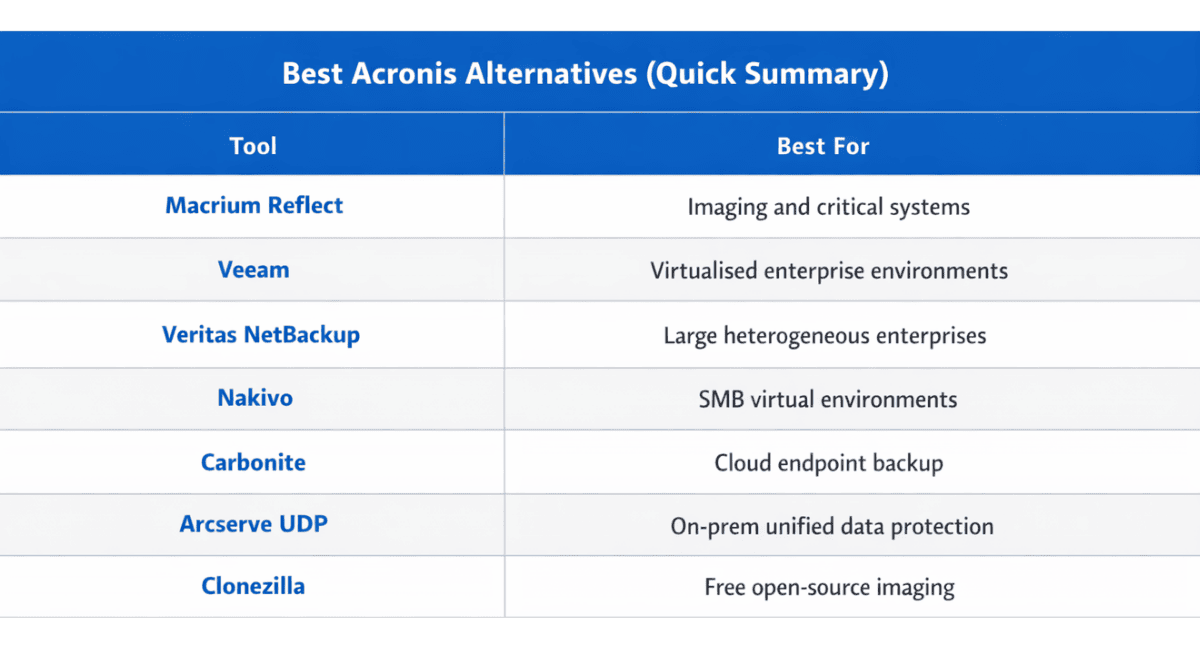
Best Acronis Alternatives (Quick Summary)
Why Teams Move Away from Acronis in 2026
Before diving into alternatives, it helps to understand the recurring triggers that push organizations toward a switch. Acronis Cyber Protect is a capable platform, but its broad, all-in-one design creates friction in certain environments.
Resource overhead and complexity top the list. Acronis bundles anti-malware, vulnerability management, patching, and backup into a single agent. For IT-managed offices, that consolidation can be convenient. For production floors running legacy Windows systems with limited compute headroom, it introduces unpredictable behaviour and unnecessary background services.
Subscription-only licensing clashes with OT asset lifecycles. Industrial controllers, SCADA servers, and embedded systems often run for 10 to 20 years. A subscription model forces ongoing renewals that rarely align with capital expenditure cycles or the reality of equipment deployed in remote, sometimes air-gapped locations.
Cloud dependency presents another barrier. Acronis is architected around centrally managed, cloud-connected service delivery. Environments that operate offline, behind strict firewalls, or in air-gapped networks struggle with licence checks, update requirements, and management features that assume reliable connectivity.
Restore confidence remains the most critical concern. Customers in OT environments frequently report uncertainty about whether their Acronis backups will actually restore on mixed or legacy hardware, particularly when performing bare-metal recovery to dissimilar systems.
7 Best Acronis Alternatives for Backup and Recovery
If you’re looking for the best Acronis Cyber Protect alternatives we’ve reviewed the best of the Acronis competitors with where we think they are best suited. We've evaluated them against the pain points that most commonly drive teams to look for Acronis alternatives: restore reliability, footprint, offline capability, ownership structure and licensing alignment.
1. Macrium Reflect (Standalone) or SiteBackup (Centralized): Best Acronis Alternative for OT and Critical Systems
Macrium is a specialist imaging and recovery tool built for environments where failure is not an option. Rather than bundling security suites and cloud management features, Macrium focuses on one job: fast, deterministic system recovery with a minimal footprint. This philosophy makes it the strongest fit for OT, embedded, and long-lifecycle Windows environments.
Where Macrium consistently outperforms Acronis is restore reliability, especially on mixed and legacy systems. It supports dissimilar hardware recovery and delivers predictable results in environments where other tools fail. Its lightweight agent runs with minimal background services, CPU priority controls, and bandwidth throttling, keeping operational impact low during production hours.
For air-gapped and offline environments, Macrium operates fully on-premise with offline activation and zero cloud or licence-check dependency. One limitation to consider is that Macrium focuses on image-based backup and recovery rather than native cloud backup services, so organisations looking for fully integrated cloud storage typically pair it with their preferred storage provider or repository architecture.
For business backup, perpetual and LTSC licensing options align directly with 10- to 20-year OT asset lifecycles, so licences never expire in the field. You can explore Macrium's business backup and recovery solutions to see how its centralised solutions help your deployment scale.
The detailed Macrium vs Acronis comparison covers the full head-to-head breakdown across recovery behaviour, operational impact, and ransomware protection approaches. Independent reviewers have taken note as well: Macrium earned recognition as a G2 Fall 2025 High Performer in PC Backup, reinforcing its standing for reliable imaging.
2. Veeam: Best for Virtualised Enterprise Workloads
Veeam dominates in virtualised data centre environments, particularly for VMware and Hyper-V workloads. Its snapshot-based backup engine and instant VM recovery capabilities make it a natural choice for enterprises running large-scale virtual infrastructure.
Veeam's strength lies in application-aware processing, granular recovery for Microsoft 365 and Active Directory, and a mature ecosystem of integrations with major storage and cloud providers. It also supports immutable backup repositories, aligning with the 3-2-1-1-0 backup strategy that regulatory bodies increasingly mandate.
The trade-off is complexity and cost. Veeam's licensing scales per workload, and the management overhead suits dedicated IT teams rather than lean OT operations. It also assumes consistent network connectivity, making it a poor fit for air-gapped or edge deployments where connectivity is intermittent or non-existent.
3. Veritas NetBackup: Best for Large Heterogeneous Enterprises
Veritas NetBackup targets large enterprises managing petabytes of data across mixed operating systems, databases, and cloud platforms. Its breadth of platform support, including Linux, Unix, Windows, and major cloud hyperscalers, makes it suitable for organizations with complex, heterogeneous IT estates.
NetBackup excels at policy-driven automation and provides strong deduplication capabilities that reduce storage costs at scale. Its compliance and governance features satisfy stringent regulatory requirements in financial services and healthcare.
However, NetBackup carries significant deployment complexity and a steep learning curve. The platform uses a multi-tier architecture that typically includes a primary (master) server, one or more media servers, and multiple client systems to manage backup operations and storage targets. About Deploying NetBackup
While this architecture enables large-scale enterprise deployments, it also introduces infrastructure and operational overhead. For small to mid-sized environments or operational technology use cases, this level of complexity often outweighs the benefits.
4. Nakivo: Best for SMB Virtual Environments
Nakivo positions itself as a cost-effective backup solution for small and mid-sized businesses running virtual workloads. It supports VMware, Hyper-V, Nutanix, and AWS EC2, delivering solid recovery capabilities without the enterprise price tag.
The platform offers incremental backup with change tracking, instant granular recovery, and built-in ransomware protection through immutable repositories. Its web-based management console keeps administration straightforward, making it accessible to teams without dedicated backup specialists.
Nakivo's limitation surfaces in physical endpoint and OT scenarios. Its architecture centres on virtual machine backup, leaving gaps for organisations that need bare-metal imaging of physical Windows systems or air-gapped deployment flexibility.
5. Carbonite (OpenText): Best for Cloud-First Endpoint Backup
Carbonite, now part of OpenText, focuses on continuous cloud backup for endpoints and small business servers. Its automatic, set-and-forget approach appeals to organisations that want offsite protection without managing local backup infrastructure.
The tool excels at file-level backup with unlimited cloud storage options and straightforward per-device pricing. For remote workforces and distributed offices where endpoints generate the primary data risk, Carbonite provides a low-friction safety net.
Where Carbonite struggles is in system imaging, bare-metal recovery, and any scenario requiring offline operation. It depends entirely on internet connectivity and does not support the kind of full-system recovery that OT, manufacturing, or any downtime-sensitive environment demands.
6. Arcserve UDP: Best for Unified Data Protection with On-Prem Focus
Arcserve UDP combines image-based backup, tape support, and built-in high availability into a single platform. It supports both physical and virtual workloads across Windows and Linux, offering a middle ground between enterprise complexity and SMB simplicity.
Its Assured Recovery feature automates restore testing, which addresses one of the most common backup failures: untested backups that fail when you actually need them. Arcserve also integrates Sophos anti-ransomware into its agent, adding a layer of active protection at the endpoint level.
Arcserve's challenge is market presence and ecosystem maturity. Compared to Veeam or Veritas, its integration ecosystem is smaller, and community support resources are less extensive. Organisations evaluating Arcserve should verify compatibility with their specific storage targets and virtualisation platforms.
7. Clonezilla: Best Free Option for Technical Teams
Clonezilla is a free cloning and imaging tool that appeals to technically proficient teams seeking a zero-cost solution. It supports a wide range of file systems and can perform bare-metal cloning of physical machines with respectable speed.
For lab environments, test benches, or internal IT teams comfortable with command-line workflows, Clonezilla delivers reliable imaging without licensing costs. Its multicast capability also enables efficient deployment across multiple machines simultaneously.
The significant downside is usability and support. Clonezilla offers no graphical management console, no scheduling automation, no incremental backup capability, and no vendor support. For production environments where recovery must be fast, consistent, and operable by non-specialists, Clonezilla introduces risk.
Best Acronis Alternatives at a Glance
The following table compares each alternative across the criteria that matter most when replacing Acronis. Use it to quickly identify which solutions align with your environment, operational constraints, and licensing requirements.
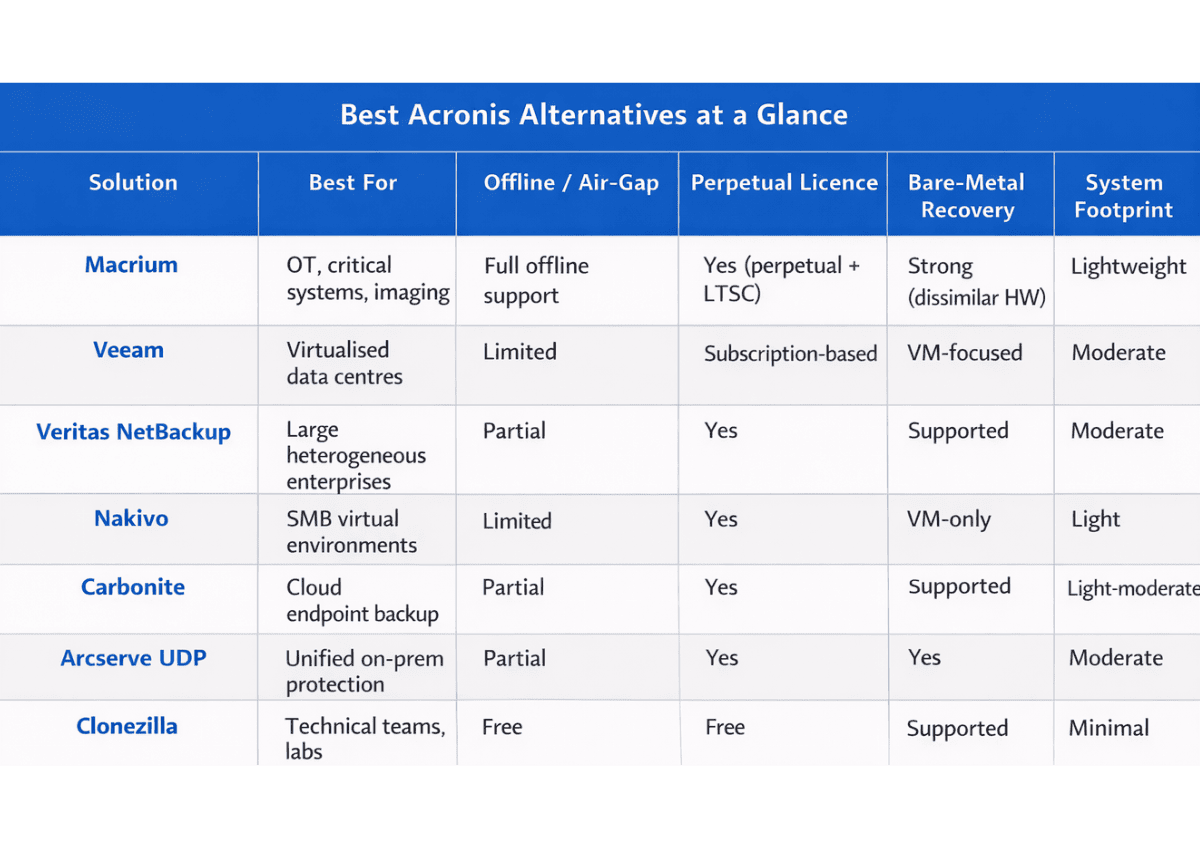
When evaluating these options, your backup solution buying guide should prioritise recovery reliability and deployment fit over feature counts. A tool that restores perfectly in a connected data centre may fail completely on an air-gapped production line.
Choosing the Right Alternative for Your Environment
The right Acronis alternative depends entirely on your operational context. A Gartner-cited analysis found that organisations implementing Zero Trust Network access reduce cyber breach risk by up to 50%, reinforcing that recovery strategy must integrate with your broader security posture, not replace it.
If your environment includes mixed or legacy Windows systems, air-gapped networks, or assets with 10- to 20-year lifecycles, the decision matrix narrows quickly. You need a tool that operates offline, supports perpetual licensing, and delivers deterministic bare-metal recovery without bundled services inflating the agent footprint. That profile points directly to Macrium.
For virtualised IT estates with dedicated backup administrators, Veeam or Veritas provide mature, feature-rich platforms. For budget-conscious SMBs running primarily virtual workloads, Nakivo offers strong value. Cloud-only endpoint protection suits Carbonite's strengths, though it won't satisfy imaging or disaster recovery requirements.
Real-world results reinforce why recovery reliability matters. A DevOpsSchool analysis reported that manufacturing environments adopting high-frequency image-based backups cut RPO from 24 hours to 15 minutes and achieved full system recovery of 75+ production VMs in under 2 hours during a live ransomware drill. Those results demand a backup tool built for speed and predictability, not platform breadth.
Building a ransomware-resilient data backup strategy also means protecting backup files themselves. Macrium’s “Image Guardian” shields backup images from ransomware encryption at the file system level, ensuring it can only be modified by Macrium software itself, while keeping security responsibilities properly separated rather than bundling anti-malware into the backup agent.
What to look for when evaluating Acronis alternatives:
• Backup reliability
• Bare metal restore capability
• Licensing flexibility
• Support for air-gapped environments
• System resource footprint
Make the Switch with Confidence
The best Acronis alternatives solve specific problems rather than trying to be everything for everyone. If your priority is reliable, fast recovery in environments where complexity and downtime carry serious consequences, Macrium consistently emerges as the strongest choice for 2026 and beyond.
Its specialist approach, lightweight footprint, full offline capability, and perpetual licensing align with how critical systems actually operate in the real world. Explore Macrium's business solutions to see how the platform fits your infrastructure, or request a trial to test recovery performance in your own environment.
If you're currently under contract with Acronis, Macrium also offers a one-year parallel validation programme, allowing you to run Macrium alongside your existing solution at no cost to test restore performance before making a switch. Find out more here.
Frequently Asked Questions for Choosing a Backup and Recovery Solution
What should I test in a proof of concept before switching backup platforms?
Run a full restore test, not just a backup job, and include both a same-hardware and a changed-hardware scenario if your environment varies. Validate bootability, application start-up, and network configuration restoration. Document exact recovery steps so the process is repeatable under pressure. Time how long it takes to restore on each Acronis competitor’s software.
How can I reduce disruption to production when deploying a new backup agent?
Start with a phased rollout on low-risk machines, then expand by line, site, or shift to limit operational impact. Coordinate backup windows with maintenance schedules and set clear performance baselines so you can spot regressions early. Keep a rollback plan that restores the previous agent and policies quickly.
What role do retention policies and storage costs play in choosing an alternative?
Retention determines how quickly storage grows, especially with image-based backups and frequent restore points. Map retention requirements to your storage tiering strategy (local, replicated, immutable, archived) to avoid cost surprises. Ask vendors how deduplication, compression, and synthetic fulls affect real-world capacity.
How do I handle regulatory and audit requirements when changing backup vendors?
Confirm the new platform can produce tamper-evident logs, restore-test evidence, and policy reports aligned to your audit framework. Plan a transition period where you retain legacy backups long enough to satisfy retention and eDiscovery obligations. Involve compliance early so documentation and controls are updated before cutover.
What is the best way to protect backups from insider threats, not just ransomware?
Enforce least-privilege access, separate admin roles, and require MFA for backup consoles and storage targets. Use immutable or write-once storage where possible, and isolate backup credentials from domain admins. Monitor for unusual deletion, retention changes, or repository access patterns.
How should multi-site organizations standardize backups across different environments?
Define a baseline policy set by workload type (endpoints, physical servers, VMs) and allow controlled exceptions for site constraints. Centralize reporting and alerting so failures are visible in one place, even if backup execution is local. Standardize naming, tagging, and runbooks to speed troubleshooting and restores.
How We Evaluated These Alternatives
These tools were assessed using vendor documentation, independent reviews, and discussions from IT communities and technical forums. We focused on factors most often raised by teams replacing Acronis, including restore reliability, system footprint, licensing flexibility, offline capability, and overall fit for real-world infrastructure environments.
Author: Brooke Watson, Content Marketing Manager, Macrium
Last Reviewed: 12/03/2026
Previous Post
Best Backup Software 2026: The Essential Buyer’s Guide
Next Post
Macrium vs Acronis: what's the best solution for your environment?